























Search engines depend on clear paths to find your pages. An XML sitemap gives them a simple list of your important URLs, so Google and other crawlers can index your site faster.
At Digital Wit, we often recommend sitemaps for site owners, bloggers, e-commerce stores, and new websites that have few backlinks. An XML sitemap is not a must for every site, but it improves search visibility and reduces the chance of missing pages.
What Is an XML Sitemap?
An XML sitemap is a file that lists all important pages of a website. It helps search engines like Google and Bing find and index content efficiently. By using a sitemap, even deep or new pages can be discovered faster.
How XML Sitemap Works
The sitemap acts as a communication tool between your website and search engine crawlers. Googlebot and other crawlers read this file to understand your site structure. This ensures that no important page is left unindexed, improving search visibility over time.
If you want expert help to optimize your site and implement sitemaps efficiently, you can learn more about How We Work as the Leading SEO Agency in Bangladesh.
XML Sitemap vs HTML Sitemap
An XML sitemap is made for search engines, not for users. It focuses on URLs, metadata, and indexing signals. An HTML sitemap, on the other hand, is designed for visitors. It helps users navigate the site but does not directly impact crawling or indexing.
Anatomy and Format
A proper XML sitemap starts with an XML declaration and UTF-8 encoding. The <urlset> container holds all <url> entries. Each entry must include <loc>, which shows the page URL. Optional tags include <lastmod> for last update, <changefreq> for update frequency, and <priority> for importance. Google often ignores <changefreq> and <priority>, but <loc> and <lastmod> are important.
Example of a Simple XML Sitemap
<?xml version=”1.0″ encoding=”UTF-8″?>
<urlset xmlns=”http://www.sitemaps.org/schemas/sitemap/0.9″>
<url>
<loc>https://example.com/</loc>
<lastmod>2025-12-11</lastmod>
<changefreq>weekly</changefreq>
<priority>1.0</priority>
</url>
</urlset>
This format follows Sitemap protocol version 0.90 and ensures that crawlers can read your website easily.

Types of Sitemaps and Extensions
Standard XML Sitemap
A standard XML sitemap lists all important URLs of a website. It helps search engines crawl and index pages efficiently. Most small to medium websites can use a single XML sitemap.
Sitemap Index
A sitemap index file is used when a website has multiple sitemaps or a large number of URLs. It points to individual sitemap files, making it easier for search engines to find all pages. Large websites or e-commerce stores often need this.
Specialized Variants
- Image sitemaps: Help search engines discover images on your site.
- Video sitemaps: Share video content details like title, duration, and description.
- Google News sitemaps: Used for news articles that need faster indexing.
Alternatives and When to Use Them
- HTML sitemap: Helps users navigate a website easily.
- Text sitemap: Simple list of URLs for basic indexing.
- RSS/Atom feeds: Useful for dynamic content like blogs or frequently updated sites.
Which Pages to Include (and Exclude)
Pages to Include
You should include pages that are indexable, canonical, and high-quality. These pages help search engines find your important content quickly. Include pages that are SEO-relevant and contain valuable information. Examples:
- Main blog posts and articles
- Product or service pages
- Landing pages with important content
Pages to Exclude
Avoid including pages that may confuse search engines or do not add value. Examples of pages to exclude:
- Noindex pages
- Duplicate content
- Redirects or broken links
- Admin, staging, or login pages
- Low-value or thin content
Handling Special Cases
Some pages need special attention. For dynamic or large sites, you should handle:
- Pagination and archive pages carefully
- Categories and tag pages if useful for SEO
- Orphan pages that are not linked anywhere
How to Create an XML Sitemap
Creating an XML sitemap starts with proper preparation. You should first audit your website to list all important URLs. Decide which pages to include based on SEO relevance, canonical status, and content quality. Exclude pages that are blocked, no-index, or low value. This step ensures that search engines crawl the right pages and improves indexing efficiency.
Using CMS Plugins
For most website owners, using a CMS plugin is the easiest method. WordPress users can use Yoast SEO or Rank Math to automatically generate an XML sitemap. Other platforms like Shopify, Wix, Squarespace, Joomla, and Drupal also provide plugins or built-in tools.
These plugins update the sitemap automatically whenever new pages are added or removed. This method saves time and ensures that your sitemap is always accurate.
Online Generators and Tools
If you do not use a CMS or prefer external tools, online generators are a good option. Free tools like XML-Sitemaps.com and Screaming Frog can create a sitemap quickly. Paid tools like Ahrefs or SEMrush offer advanced features and regular updates. These tools scan your website and produce a properly formatted sitemap.xml file ready to submit to search engines.
Manual Creation
For small or static websites, you can create a sitemap manually. Open a text editor and write XML code including the <urlset> container and <url> entries. Add <loc>, <lastmod>, <changefreq>, and <priority> for each URL. Save the file as sitemap.xml and upload it to your site root.
Where to Place Your XML Sitemap
You should place your XML sitemap in the root directory of your website, usually as /sitemap.xml. This helps search engines like Google and Bing find it easily. If your site has multiple sitemaps, use a sitemap index file and place it in the root as well. Make sure your sitemap is accessible and not blocked by robots.txt or other settings.
Check permissions so crawlers can read it. Proper placement ensures all your pages are discovered and indexed quickly.
Best Practices and Guidelines
Follow XML sitemap standards and use valid UTF-8 syntax. Keep each file under 50,000 URLs or 50MB. Update the sitemap regularly, include only canonical URLs, avoid overusing tags, compress with gzip, reference in robots.txt, and validate for errors.
Follow Protocol Standards and Valid XML
It is important to follow XML sitemap protocol standards. Use correct XML syntax and UTF-8 encoding. This ensures that search engines can read your sitemap without errors.
Respect Limits and Use Index Files
A single sitemap should not exceed 50,000 URLs or 50MB in size. For larger sites, use a sitemap index file. This keeps your sitemap organized and crawlable by search engines.
Keep Sitemap Updated and Include Canonical URLs
Update your sitemap whenever content changes. Automating updates is recommended for dynamic sites. Only include canonical and indexable URLs to improve crawling efficiency.
Additional Guidelines
You can compress your sitemap using gzip to reduce load time. Reference your sitemap in robots.txt to make it easier for crawlers. Always validate the sitemap for syntax errors and broken URLs.
How to Submit and Monitor Your Sitemap
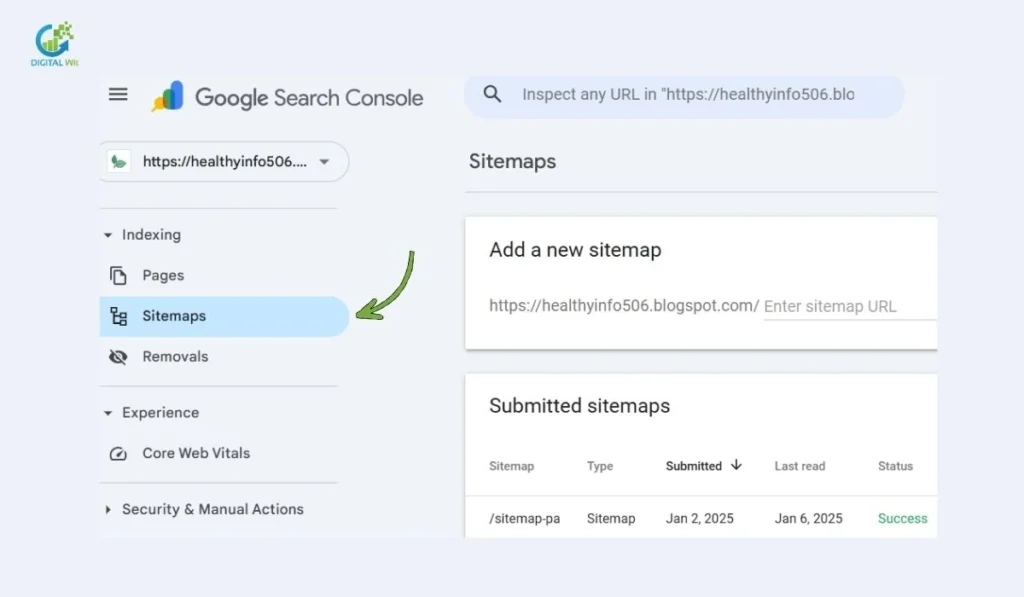
Submitting your XML sitemap helps search engines crawl and index your website efficiently. First, declare the sitemap in your robots.txt file using the Sitemap: directive. Next, submit it to Google Search Console by adding the sitemap URL or sitemap index file.
You can also submit it to Bing Webmaster Tools and other search engines like Yandex or Baidu if needed. After submission, monitor your sitemap regularly:
- Check coverage reports to see which pages are indexed
- Review crawl stats for errors or issues
- Fix broken links or non-indexed pages promptly
Regular monitoring ensures all important pages are discovered quickly.
SEO Impact and Limitations
An XML sitemap helps search engines crawl and index your website more efficiently. It is especially useful for new pages or content buried deep within your site. By providing a clear list of all important URLs, it ensures search engines discover updates quickly.
Additionally, optimizing your site structure and technical performance, such as improving site speed & Core Web Vitals, complements the sitemap and enhances overall SEO effectiveness.
However, having a sitemap does not guarantee higher rankings. It supports your SEO strategy but cannot replace quality content, strong internal linking, or backlinks. For best results, combine it with On-Page & Technical SEO practices to improve site structure, meta tags, and crawl efficiency.
Key points:
- Improves crawl efficiency and indexing speed
- Helps search engines find new or deep pages
- Supports SEO but does not directly boost rankings
- Works best alongside good site structure and content quality
You can pair an XML sitemap with strong On-Page SEO Techniques to ensure that search engines not only find your pages quickly but also understand their relevance and structure clearly.
Practical Step-by-Step Guide for Beginners
Creating an XML Sitemap is easier than many think. Follow these simple steps to help search engines crawl and index your site efficiently.
Before creating your XML sitemap, it is helpful to perform a thorough site review. By go through Technical SEO Audit Checklist can help identify important pages, broken links, and indexing issues. This ensures your sitemap includes only canonical and valuable URLs, improving crawl efficiency and overall SEO performance
Step 1: Audit and Plan URLs
Review your website and list all pages you want search engines to index. Exclude duplicate, noindex, or low-quality pages. Include canonical and important content pages.
Step 2: Choose Creation Method
Decide whether to use a CMS plugin, online sitemap generator, or manual XML creation. Plugins like Yoast SEO or Rank Math are easiest for WordPress sites.
Step 3: Generate the Sitemap
Use your chosen method to generate the sitemap.xml file. For CMS, it is usually automatic. For manual creation, write XML code listing all URLs correctly.
Step 4: Validate
Check your sitemap using online validators or Google Search Console. Ensure no broken links, correct XML syntax, and proper UTF-8 encoding.
Step 5: Upload to Root
Place the sitemap.xml in the root directory of your website for easy access by search engine crawlers.
Step 6: Submit and Add to robots.txt
Submit the sitemap in Google Search Console and Bing Webmaster Tools. Add the line Sitemap: https://yourdomain.com/sitemap.xml in robots.txt.
Step 7: Monitor and Maintain
Regularly update the sitemap after adding or removing pages. Monitor crawl stats and fix errors to maintain SEO efficiency.
Tools and Resources
To create and manage an XML sitemap efficiently, using the right tools is important. CMS plugins help automate sitemap generation for websites. For example:
- Yoast SEO
- Rank Math
Online generators and crawlers can create sitemaps quickly, even for larger sites:
- XML-Sitemaps.com
- Screaming Frog
SEO tools help analyze and monitor sitemap performance:
- Ahrefs
- SEMrush
Validators and checkers ensure your sitemap is error-free and follows XML standards.
Webmaster tools like Google Search Console and Bing Webmaster Tools allow you to submit, monitor, and track your sitemap’s indexing performance.
FAQs About XML Sitemap
1. What is an XML sitemap?
An XML sitemap is a file that lists all URLs of a website. It helps search engines like Google discover and index content faster.
2. How to create an XML sitemap?
You can create it manually, use a CMS plugin, or an online sitemap generator tool depending on your site size.
3. XML sitemap: what it is & how to create one in HTML?
HTML sitemaps are for users, while XML sitemaps are for search engines. XML files follow the sitemap protocol and include URLs with tags.
4. How to create XML sitemap in WordPress?
Use plugins like Yoast SEO or Rank Math to generate and update sitemaps automatically.
5. Do I need XML Sitemap Generator for Google plugin if I have Rank Math SEO?
No. Rank Math automatically generates and updates XML sitemaps for your site.
6. Recommendations for XML sitemap generator on a large WordPress site
Use tools like Screaming Frog, Ahrefs, or SEMrush for better control over large sitemaps.
7. Do I need to upload XML sitemap every time there is a change?
Yes, but most plugins update it automatically when content changes.
8. Is an XML sitemap necessary?
Yes, especially for large, dynamic, or new sites with few backlinks.
9. What is the role of XML sitemaps in SEO?
It improves crawl efficiency, ensures new or deep pages are indexed, but does not directly affect ranking.
Conclusion
Having an XML sitemap helps search engines find and index all your important pages quickly. It improves crawl efficiency and ensures new or deep content is discovered. Following best practices like updating regularly, including only canonical URLs, and using valid XML format keeps your sitemap effective.
Always submit it to Google Search Console and monitor errors. For expert guidance and tools to manage your sitemap efficiently, Digital Wit can help you implement best practices. Remember, a sitemap supports your overall SEO strategy but does not replace quality content, internal linking, or backlinks. Implement and maintain it for better search visibility.