





















Your website may have great content, but Google still ignores it. Why?
Hidden technical problems stop Google from reading and ranking your pages properly. potentially costing you significant traffic.. A technical SEO audit finds and fixes those problems fast.
Digital Wit, as a leading SEO agency in Bangladesh, is here to walk you through a step-by-step Technical SEO audit Checklist without any confusion or overwhelm.
What is Technical SEO Audit
A technical SEO audit is a process to check your website’s technical health. It focuses on elements that affect how search engines crawl, index, and rank your site. The main purpose is to find issues that stop your pages from performing well in search results.
This includes checking site speed, mobile-friendliness, security, and proper indexing. By doing a technical SEO audit, you can make sure search engines like Google and Bing can access and understand your content easily.
Why does technical SEO matter even if your content is great?
Technical SEO is important because it helps search engines crawl and index your site correctly. If your site has broken links, slow loading pages, or errors in robots.txt and sitemap, search engines may ignore important pages. Proper crawlability ensures Googlebot can explore all your pages.
Indexing ensures your pages appear in search results. Page speed and Core Web Vitals are also critical. Slow pages can reduce traffic and user satisfaction. Security signals like HTTPS and SSL certificates protect users and build trust. Overall, technical SEO lays the foundation for all other SEO efforts.
Who Should Perform a Technical SEO Audit and When?
Website owners, SEO specialists, and digital marketers should perform technical SEO audits. It is useful for new websites, sites with many pages, or when redesigning a site. Audits are also important after major changes, such as migrations, new plugins, or URL updates. Conducting audits periodically ensures ongoing site health and helps maintain rankings.
Even small businesses and eCommerce stores can benefit from regular audits to avoid hidden technical issues that affect visibility and traffic. A simple technical SEO audit can prevent major problems and improve overall performance.
Pre-Audit Preparation
Before starting a technical SEO audit, you need to set up essential tools. Use Google Search Console, Google Analytics, and crawler tools like Screaming Frog, Semrush, or Ahrefs to gather accurate site data. Take a backup and record baseline metrics, including indexed pages, Core Web Vitals, mobile usability, and site security.
Decide the audit scope based on your goals, whether it is a full site, high-traffic pages, post-migration checks, or specific sections. Finally, set success metrics such as reducing crawl errors, improving page speed, and tracking keyword rankings to measure your audit’s effectiveness.
Crawlability & Indexability Audit
Ensuring your website is crawlable and indexable is the first step in a technical SEO audit. If search engines cannot read your pages, your site cannot rank well.
Robots.txt Review
Check the robots.txt file to make sure it does not block important pages. Allow Googlebot and other search engines to crawl essential resources. Correct rules help search engines understand your site structure.
XML Sitemap
Verify that an XML sitemap exists and is accurate. Submit it to Google Search Console. Ensure only indexable and canonical URLs are included for better coverage.
Index Coverage in GSC
Use Google Search Console to find errors, excluded pages, noindex tags, or canonical issues. Fixing these ensures important pages are indexed correctly.
Orphan Pages & Internal Linking
Detects pages that have no internal links pointing to them. Add internal links to connect orphan pages to your main site structure for better crawling.
URL Structure & Site Architecture
Check URLs for lowercase letters, hyphens, and shallow depth. Friendly URL structure improves user experience and helps search engines crawl easily.
Canonicalization
Verify canonical tags to prevent duplicate content issues. Ensure every page has a proper canonical pointing to the correct version.
HTTPS & Security Check
Ensuring your website is secure is a key part of a technical SEO audit. Security affects both user trust and search engine rankings. Google prefers secure websites, so having proper HTTPS setup is important.
SSL Certificate Validity
An SSL certificate encrypts data between your website and visitors.
Check if your certificate is valid and not expired.
Browsers show warnings if SSL is missing, which can reduce traffic.
Renew certificates before expiration to maintain trust and SEO benefits.
HTTP to HTTPS Redirections
Redirect all HTTP pages to HTTPS to avoid duplicate content issues.
Ensure redirections do not create redirect chains, as they slow down the site.
Use 301 redirects for permanent changes.
Check old links and update them to HTTPS wherever possible.
Mixed-Content Detection
Identify pages that load HTTP resources on HTTPS pages.
These mixed contents can cause security warnings in browsers.
Update links to secure versions for images, scripts, and CSS files.
Testing tools like browser console or online scanners help detect issues.
Malware & HSTS Implementation
Scan your site regularly for malware or hacked content.
HSTS enforces HTTPS in browsers to prevent insecure connections.
Add HSTS header in your server configuration for extra security.
Maintaining security ensures both better rankings and user trust.
Site Performance & Core Web Vitals
Measure Core Web Vitals
Core Web Vitals include Largest Contentful Paint (LCP), Cumulative Layout Shift (CLS), and Interaction to Next Paint (INP).
These signals show how fast and stable your website feels for users on desktop and mobile.
You can track them using Google PageSpeed Insights or Search Console reports.
Improving these metrics ensures better user experience and higher search engine rankings.
Optimize Images
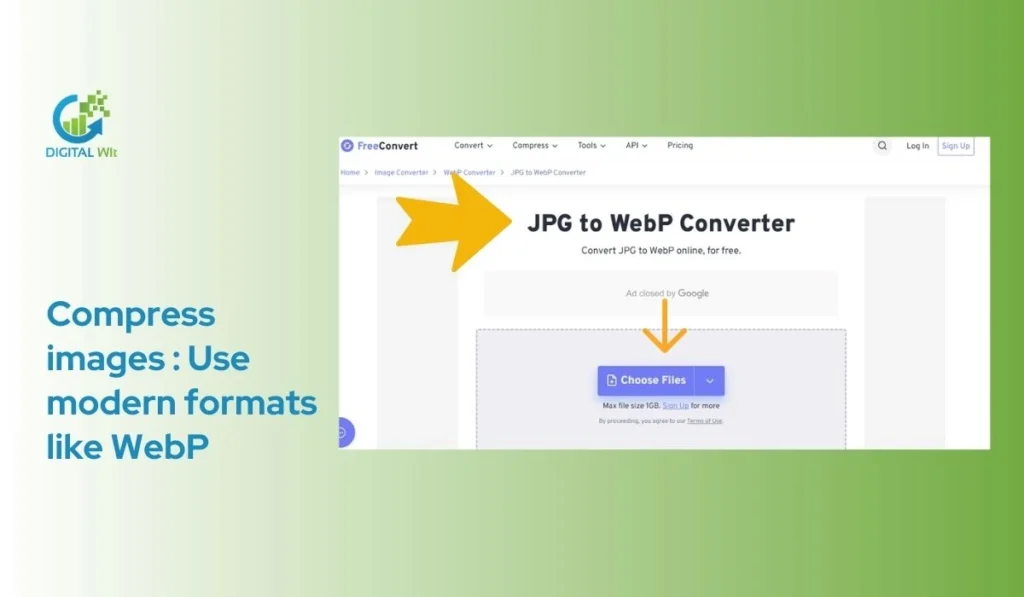
- Compress images without losing quality
- Use modern formats like WebP or AVIF
- Enable lazy loading for offscreen images
- Set responsive dimensions for different devices
Minify CSS/JS and Use Caching
Combine or minify CSS and JavaScript files.
Defer non-critical scripts to improve loading speed.
Enable browser caching and consider using a CDN.
This reduces server load and enhances page performance.
Reduce Render-Blocking and Improve Hosting
Remove render-blocking resources to let pages load faster.
Check Time to First Byte (TTFB) for server response speed.
Use reliable hosting and optimize server configuration.
Faster hosting improves user experience and SEO results.
Mobile & User Experience (UX)
A mobile-friendly design is essential for any website. It ensures users can easily navigate and read content on smartphones and tablets. Responsive layouts adjust automatically to different screen sizes. Google also prioritizes mobile-friendly sites in search results.
Legible Fonts and Tappable Buttons
Fonts must be easy to read on small screens. Buttons should be large enough to tap without mistakes. Clear spacing between elements improves usability. Proper font size and clickable buttons reduce bounce rates and improve engagement.
Avoid Intrusive Interstitials
Pop-ups and interstitial ads can frustrate visitors. They may block content or slow down page load. Avoiding intrusive elements keeps users on your site longer. Search engines also penalize sites with aggressive interstitials.
Navigation, Breadcrumbs, and Internal Linking
Good navigation helps users find pages quickly. Breadcrumbs show the website hierarchy and improve orientation. Internal links distribute link equity and guide users to related content. A well-structured menu improves both usability and SEO.
Accessibility and Layout Rendering
Websites should be accessible to all users, including those with disabilities. Infinite scroll must work properly and not break page structure. Correct layout rendering ensures all elements appear as intended across devices.
On-Page & HTML Element Audit
Title Tags
Title tags are very important for both users and search engines. They should be unique for each page and include relevant keywords naturally. Keep the length proper so it shows fully in search results. Avoid using duplicate titles across your website.
Meta Descriptions
Meta descriptions help searchers understand what your page is about. Each meta description must be unique, clear, and relevant to the page content. Make sure it is written naturally while including key phrases for technical SEO audit.
Header Tags (H1-H6)
Use header tags in a proper hierarchy. Only one H1 should be on a page and include the main topic. Subheaders (H2-H6) should organize content logically. This makes content easier to read and crawl by search engines.
Images
All images must have descriptive alt text and proper filenames. Optimize images for size and responsiveness. This improves page speed and accessibility. Proper image optimization is a key step in technical SEO audit.
Canonical Tags
Canonical tags prevent duplicate content issues. Ensure your canonical URLs are consistent with WWW or non-WWW and HTTP or HTTPS versions. This helps search engines understand the main version of each page.
OG/Social Metadata and Favicons
Check OG metadata for social sharing and set proper favicons. Ensure images have the correct preview settings. These elements improve user experience and enhance your website’s technical SEO performance.
Internal Linking & Site Structure Audit
A strong internal linking system helps search engines crawl your site easily. It also guides users to important pages. A clear site structure improves both usability and SEO performance.
Main Navigation and Footer
Your main menu and footer should include all key pages. This helps visitors find content quickly. Properly organized navigation reduces bounce rates. Breadcrumbs in navigation make it easy for users to understand where they are on the site.
Internal Link Distribution
Ensure important pages receive enough links from other pages. This passes link authority and improves ranking potential. Check for orphan pages and link them appropriately. Fix broken links to maintain user trust and prevent crawl errors.
Logical Hierarchy and Silo Structure
Organize content into categories and subcategories. Group related content together for better navigation. A silo structure helps search engines understand topic relevance.
Anchor Text and Usability
Use descriptive and relevant anchor text for internal links. Avoid overloading pages with too many links. Keep breadcrumbs and faceted navigation clear.
Duplicate Content, Redirect & URL Issues Audit
Duplicate content and poor URL management can hurt your site’s SEO performance. A technical SEO audit helps detect and fix these issues to improve crawlability and rankings.
Detect and Resolve Duplicate Content
Duplicate content can confuse search engines and reduce your page authority. Use canonical tags to indicate the preferred version. You can also consolidate similar pages to a single URL. Regularly check for duplicates in content management systems and across your site.
Redirect Rules and Fixes
Redirect chains and loops waste crawl budget and slow page indexing. Implement proper 301 redirects for moved pages. Fix 404 errors to ensure users and search engines reach valid content. Test all redirects after changes to confirm they work correctly.
Consistent URL Structure
Maintain clean and readable URLs. Use lowercase letters and hyphens instead of underscores. Avoid unnecessary parameters or session IDs. Follow a logical hierarchy that reflects your site’s content structure for better indexing.
Structured Data & Schema Markup Audit
Structured data helps search engines understand your website better. It improves your chances of appearing in rich results and increases visibility on search engine results pages.
Implement Appropriate Structured Data
You should use structured data types like JSON-LD, FAQ, Product, and Breadcrumbs. Each type serves a specific purpose:
- JSON-LD for general content and site structure
- FAQ for question and answer pages
- Product for ecommerce listings
- Breadcrumbs for showing page hierarchy
Validate Structured Data
After implementation, validate using tools like Rich Results Test or Schema Validator. Check for errors and warnings.
Ensure Consistency Across Devices
Structured data must work on both mobile and desktop. Test pages on different devices to ensure uniform results.
Content & Duplicate Review
Detect and Resolve Duplicate Content
Duplicate content can harm your site rankings. Use tools like Google Search Console or Screaming Frog to find repeated pages. Remove or consolidate duplicates using canonical tags or 301 redirects. Ensure each page has unique meta titles and descriptions to avoid confusion for search engines.
Check Thin and Auto-Generated Pages
Thin content provides little value. Identify pages with very few words or auto-generated content. Update them with useful information, images, or guides. Remove doorway pages that exist only for search engines.
Ensure Keyword-Targeted and E-E-A-T Compliant Content
Content should target relevant keywords naturally. Organize content with headings and subheadings. Include clear author and publisher details. Maintain expertise, experience, authority, and trustworthiness in every article.
Verify Publication Dates and Updates
Always show when content was published and last updated. This signals freshness to search engines. Keep an audit of updates for historical reference and monitoring SEO performance.
Internationalization & hreflang (if applicable)
Proper international SEO ensures your website is correctly shown in different languages and regions. This helps search engines like Google understand which page to show to users in specific countries or languages.
Hreflang Tags and Language Codes
Hreflang tags tell search engines which version of a page to show for different languages or regions.
- Use correct language codes like en, bn, fr, or regional codes like en-us, en-gb
- Implement return tags so that each page references its alternate versions
- Include an X-default tag for users whose language or region is not specified
Canonicalization and Indexing for Localized Content
Localized content must be canonicalized to prevent duplicate content issues.
- Ensure each language version has a proper canonical URL
- Check that all versions are indexed correctly in search engines
- Avoid creating multiple pages with the same content for different languages
Avoid Automatic Redirection
Automatic redirection can cause indexing and user experience problems.
- Do not redirect users based on IP or browser language automatically
- Let users choose their preferred language manually if possible
- Confirm that search engines can access all versions of the site
Log File & Crawl Budget Analysis (for large sites)
Analyzing log files and crawl budget is important for large websites. It helps you understand how search engines crawl your site. By checking these, you can find errors and optimize site performance.
Analyze Server and Crawl Logs
Server logs record every visit by search engine bots. You can track which pages are crawled often and which are ignored. Look for unusual patterns or repeated errors. This helps detect wasted crawl budgets and improves indexing efficiency.
Detect Crawl Waste and Patterns
Check which pages receive multiple bot visits without adding value. Identify low-value pages or old URLs consuming crawl budget. Adjust robots.txt or noindex tags to reduce unnecessary crawling.
Identify 4xx/5xx Errors
Review server logs for 4xx and 5xx errors. These include broken pages or server failures. Fixing them ensures search engines can access important content. Regular monitoring prevents ranking drops.
Optimize Crawl Budget
Prioritize crawling of important pages like high-traffic or new content. Use internal linking and sitemaps to guide bots. Removing duplicate or low-value pages improves crawl efficiency and indexing.
Advanced Technical Checks
JavaScript SEO
JavaScript can hide content from search engines if not handled properly. You should check that key content is rendered correctly. Use Google Search Console to see which pages are indexed. Make sure dynamic content loads for both desktop and mobile users.
Redirect Optimization
Redirect chains and loops can slow down your site. Maintain a proper redirect map to track all 301 redirects. Fix broken redirects and ensure users land on the correct pages. This improves crawl efficiency and avoids link equity loss.
Server & CDN Settings
Check your CDN and caching headers for fast page load. Review server configurations to avoid errors like 500 or 502. Third-party scripts should not slow down your pages. Regularly audit these to maintain site performance.
Analytics & Rank Tracking
Tracking your website’s performance is crucial in a technical SEO audit. Analytics help you understand traffic patterns and identify pages that perform well.
Benchmark Organic Traffic and Top Pages
Use tools like Google Analytics or GA4 to measure organic traffic. Identify top-performing pages and note their engagement metrics. This helps prioritize pages for optimization. Track changes regularly to see improvements after technical fixes.
Monitor Core Web Vitals
Measure LCP, CLS, and INP for all important pages. Compare desktop and mobile scores. These metrics show how well your site performs for users.
Track Keywords and Competitors
Monitor keyword rankings using Google Search Console or SEO tools. Compare performance with competitors. Note which keywords need more focus.
Set Alerts for Issues
Set notifications for crawl errors or traffic drops. Quick alerts allow you to fix problems before they impact rankings.
Audit Report & Action Plan Template
After completing your technical SEO audit, creating a clear report is very important. It helps you track issues and improvements in an organized way.
Document Findings
List all issues you find during the audit. Include the priority of each problem and provide recommendations to fix them. Make it easy for anyone to follow.
Track Baseline vs Post-Fix Metrics
Record your current metrics before fixing issues. Include indexed pages, page speed scores, and mobile usability. Compare these after making changes to measure improvement.
Prioritize Fixes
Focus on problems that have the highest impact first. Balance effort and benefit to fix the most important issues quickly. Less critical issues can follow later.
Schedule Follow-Up Audits
Plan audits regularly, such as quarterly, or after major site changes. This ensures your website stays healthy and performs well in search engines.
Action Plan & Monitoring
Create a detailed action plan with timelines and assign responsibilities. Track success using Google Search Console and Google Analytics to monitor post-fix improvements.
Bonus / Advanced Checks
Redirect Hygiene and Map Maintenance
Check all your redirects to make sure they point correctly. Avoid redirect chains and loops. Keep a clear map of all 301 redirects. This helps both users and search engines navigate your site easily.
Review Third-Party Scripts and Heavy Assets
Remove unused plugins and scripts that slow down your website. Large images, videos, or heavy files should be optimized. This improves page speed and user experience.
Accessibility and UX
Ensure mobile usability with readable fonts and tappable buttons. Check navigation, layout, and page flow. Make your site easy for all users to access.
Analytics Integration
Connect Google Analytics and Search Console. Monitor traffic, crawl rates, and rankings. Track changes after optimizations to measure success.
FAQs
1. What is a technical SEO audit checklist for successful implementation?
A technical SEO audit checklist is a step-by-step guide to check your website’s health. It helps you ensure proper crawlability, indexing, page speed, mobile-friendliness, and security. Following it prevents errors and improves your site’s performance on search engines.
2. Why is an SEO technical checklist essential for 2026?
In 2026, search engines will focus more on user experience and Core Web Vitals. A technical checklist ensures your website meets these requirements, avoids crawl errors, improves page speed, and enhances mobile usability. This helps your site rank higher and stay competitive.
3. What are the checklists of eCommerce website technical audits for on-page SEO?
For eCommerce sites, check product pages, category pages, and landing pages for duplicate content, canonical issues, proper metadata, internal linking, and page load speed. Structured data and mobile optimization are also essential for better visibility.
4. Are SEO audits and SEO checklists the same?
No. An SEO audit is the process of analyzing a website’s SEO health. A checklist is a guide to perform the audit systematically and ensure no critical element is missed.
Conclusion
A technical SEO audit is the foundation for any successful SEO strategy. It helps you find and fix issues that affect your site’s visibility and performance. You should perform audits regularly to keep your website healthy and fast by following guidance from Digital Wit. Combining technical audits with content and backlink checks ensures better results. You can visit On-Page & Technical SEO ultimate Guide for 2026.